Next.js Rendering Strategies Explained: SSR, SSG, CSR, ISR & Cache Components (2026)
Ever opened the Next.js docs and seen acronyms like SSR, SSG, CSR, and ISR thrown around like everyone's supposed to just know what they mean? You're not alone. Half the confusion around Next.js performance comes down to one simple question nobody explains clearly enough: when does your page actually get built — and where?
Once you understand that one question, every rendering strategy in Next.js suddenly makes sense. By the end of this guide, you'll know exactly what SSR, SSG, CSR, and ISR mean, how the newer Cache Components model (powered by Partial Prerendering, or PPR) ties it all together, and which one to reach for in your own projects.
Why This Matters
Every page you build has to answer one question: "When should the HTML for this page get generated?"
There are really only three possible answers:
- Ahead of time, during
next build— before any user even visits the site. - On request, every time a user visits — generated fresh on the server.
- In the browser, after the page loads — generated by JavaScript running on the user's device.
Next.js gives you a strategy for each answer, plus a smart hybrid (Cache Components) that mixes them on the same page. Here's the whole picture at a glance before we go through each one:
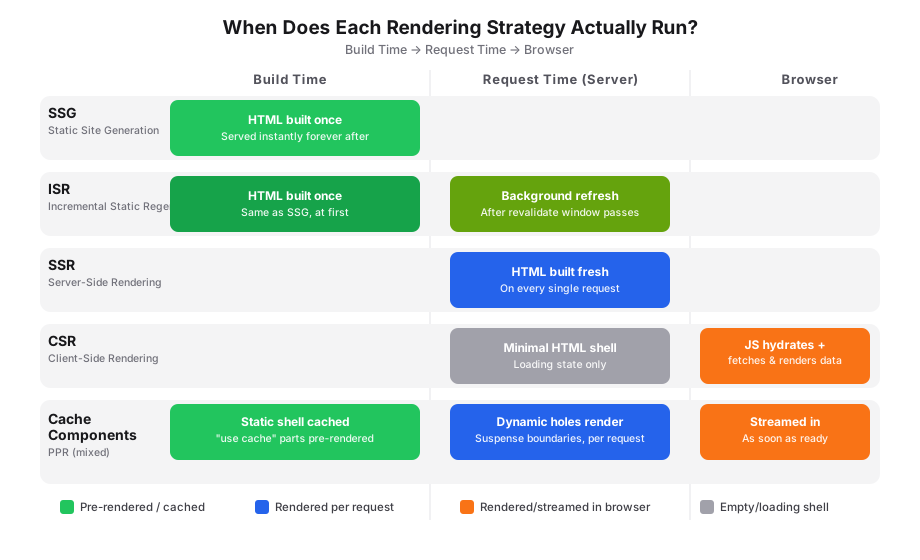
What Is SSR (Server-Side Rendering)?
💡 Think of it like: ordering food at a restaurant — you ask, the kitchen cooks it fresh, then it's served to you. Every single time.
SSR means the HTML for a page is generated on the server, for every single request. The user always gets fresh data, but the server has to do work on every visit.
In the Next.js App Router, you get SSR automatically whenever a page reads something that can only be known at request time — like cookies, headers, or search params — or when you explicitly opt a page into dynamic rendering.
// app/dashboard/page.tsx
import { cookies } from "next/headers";

export default async function DashboardPage() {
  const cookieStore = await cookies();
  const userId = cookieStore.get("userId")?.value;

  const res = await fetch(`https://api.example.com/users/${userId}`, {
    cache: "no-store", // tells Next.js: never cache this, always fetch fresh
  });
  const user = await res.json();

  return <h1>Welcome back, {user.name}</h1>;
}
What's happening here: because we read cookies() and pass cache: "no-store" to fetch, Next.js knows this page depends on request-specific data. It renders the page on the server every time someone visits, instead of reusing a cached copy.
Use SSR when:
- The content is personalized per user (dashboards, account pages).
- Data changes frequently and must always be fresh (stock prices, live order status).
⚠️ Common Mistake: Using SSR for content that rarely changes (like a blog post) wastes server resources. If the data isn't user-specific or constantly changing, you probably want SSG or ISR instead.
What Is SSG (Static Site Generation)?
💡 Think of it like: a printed menu — it's made once, in advance, and handed to every customer exactly the same.
SSG means the HTML is generated once, at build time, and then reused for every visitor. No server work happens per request — Next.js just serves the same pre-built HTML file.
// app/blog/[slug]/page.tsx
import { getPostBySlug, getAllPosts } from "@/lib/posts";

// This tells Next.js which pages to pre-build at build time
export async function generateStaticParams() {
  const posts = getAllPosts();
  return posts.map((post) => ({ slug: post.slug }));
}

export default async function BlogPostPage({
  params,
}: {
  params: Promise<{ slug: string }>;
}) {
  const { slug } = await params;
  const post = getPostBySlug(slug);

  return (
    <article>
      <h1>{post.title}</h1>
      <p>{post.description}</p>
    </article>
  );
}
What's happening here: generateStaticParams() tells Next.js exactly which blog post pages exist. At build time, Next.js renders each one into static HTML. When a real visitor requests /blog/my-post, the server just hands over the already-built file — no rendering work, no database hit, nothing. It's instant.
Use SSG when:
- Content doesn't change often (blog posts, marketing pages, documentation).
- You want the fastest possible load times and lowest server cost.
⚠️ Common Mistake: If your content updates frequently but you're using pure SSG, visitors will keep seeing stale data until you rebuild and redeploy the entire site. That's exactly the problem ISR solves — keep reading.
What Is CSR (Client-Side Rendering)?
💡 Think of it like: ordering a build-it-yourself meal kit — the server hands you the box and instructions (a minimal HTML shell), but your browser does the actual cooking (fetching data and rendering the final content).
A common misconception is that CSR means the server does nothing. It doesn't — Next.js still renders and sends a minimal HTML shell from the server for Client Components (usually the loading/empty state). What makes it "client-side" is that the data fetching and the final content render happen in the browser, after JavaScript downloads and runs. The browser then "hydrates" that HTML — attaching event listeners and making it interactive — before fetching data and re-rendering with the real content.
In Next.js, you get CSR by using Client Components with hooks like useState and useEffect (or a data-fetching library like React Query).
// components/live-notifications.tsx
"use client";

import { useEffect, useState } from "react";

type Notification = { id: string; message: string };

export function LiveNotifications() {
  const [notifications, setNotifications] = useState<Notification[]>([]);

  useEffect(() => {
    fetch("/api/notifications")
      .then((res) => res.json())
      .then(setNotifications);
  }, []);

  return (
    <ul>
      {notifications.map((n) => (
        <li key={n.id}>{n.message}</li>
      ))}
    </ul>
  );
}
What's happening here: the "use client" directive tells Next.js this component should be interactive in the browser. The server sends an initial HTML shell (which may contain little or no real data), then the browser fetches data and renders the final UI after hydration. Once JavaScript loads and hydrates that HTML, useEffect fires, fetches data from /api/notifications, and re-renders the list with real content — all in the browser.
Use CSR when:
- The content is highly interactive and user-specific (notification feeds, live chat, dashboards that update constantly).
- SEO doesn't matter for that specific piece of UI (search engines don't need to see it).
⚠️ Common Mistake: Making your entire page a Client Component "just to be safe." This kills SEO and slows down the initial load. Only mark the interactive parts as client components — let everything else stay on the server.
What Is ISR (Incremental Static Regeneration)?
💡 Think of it like: a printed menu that quietly reprints itself in the background every hour — customers always get a menu instantly, and it's rarely more than an hour out of date.
ISR is SSG's smarter sibling. Pages are still pre-built and served instantly like static pages, but Next.js automatically regenerates them in the background after a set amount of time, without you needing to rebuild and redeploy your whole app.
// app/products/[id]/page.tsx
async function getProduct(id: string) {
  const res = await fetch(`https://api.example.com/products/${id}`, {
    next: { revalidate: 3600 }, // regenerate this page at most once every hour
  });
  return res.json();
}

export default async function ProductPage({
  params,
}: {
  params: Promise<{ id: string }>;
}) {
  const { id } = await params;
  const product = await getProduct(id);

  return (
    <div>
      <h1>{product.name}</h1>
      <p>${product.price}</p>
    </div>
  );
}
What's happening here: revalidate: 3600 tells Next.js "this page can be served from cache for up to 3,600 seconds (1 hour)." The first visitor after that hour expires still gets the old cached page instantly — but Next.js triggers a regeneration in the background, so the next visitor gets the updated version. Nobody ever waits for a rebuild.
Use ISR when:
- Content changes occasionally, but not so often that it needs to be SSR (product pages, pricing pages, news listings).
- You want the speed of static pages without manually rebuilding every time data changes.
What Are Cache Components (and PPR)?
This is where things get genuinely exciting — and where most beginner tutorials stop short.
💡 Think of it like: a restaurant table that's already set, with bread on it the moment you sit down (static shell) — while your actual hot meal (dynamic content) is still being cooked and gets brought out the second it's ready.
Cache Components is Next.js's newer model for controlling caching explicitly, and it's what powers Partial Prerendering (PPR) under the hood. Instead of choosing one rendering strategy for an entire page, PPR lets a single page mix static and dynamic content together.
Here's the key idea: Next.js pre-renders a static "shell" of your page instantly (the parts that don't depend on the current request), and then streams in the dynamic parts as soon as they're ready — all without making the visitor wait for the slowest piece of data.
Step 1: Enable Cache Components
// next.config.ts
import type { NextConfig } from "next";

const nextConfig: NextConfig = {
  cacheComponents: true, // turns on the Cache Components / PPR model
};

export default nextConfig;
💡 Tip: Once
cacheComponentsis enabled, Next.js stops caching things implicitly. You now have to explicitly mark what should be cached using"use cache"— this makes caching predictable instead of "magic."
Step 2: Mark cacheable parts with "use cache"
// app/store/page.tsx
import { Suspense } from "react";
import { CartStatus } from "@/components/cart-status";

async function FeaturedProducts() {
  "use cache"; // this function's result gets cached and reused

  const res = await fetch("https://api.example.com/products/featured");
  const products = await res.json();

  return (
    <ul>
      {products.map((p: { id: string; name: string }) => (
        <li key={p.id}>{p.name}</li>
      ))}
    </ul>
  );
}

export default function StorePage() {
  return (
    <div>
      <h1>Welcome to the Store</h1>

      {/* Static shell — cached, renders instantly */}
      <FeaturedProducts />

      {/* Dynamic hole — depends on the current user, streams in separately */}
      <Suspense fallback={<p>Loading your cart...</p>}>
        <CartStatus />
      </Suspense>
    </div>
  );
}
What's happening here: FeaturedProducts has "use cache" at the top, so Next.js treats it as part of the static shell — it's pre-rendered and reused across visitors, just like SSG. CartStatus, on the other hand, depends on who's visiting (their cart), so it's wrapped in <Suspense>. Next.js sends the static shell (heading + featured products) instantly, then streams in the cart status the moment it's ready — without blocking the rest of the page.
This is the best of every world: the instant load of SSG, the freshness of SSR, all on the same page, without you manually choosing one strategy for the whole route.
💡 Tip: You can control how long cached content lives using
cacheLife()(time-based expiry) and invalidate it on demand usingcacheTag()+revalidateTag()— similar in spirit to ISR'srevalidate, but with much finer control over what gets invalidated and when.
⚠️ Common Mistake: Don't put
"use cache"on a function that returns data specific to the logged-in user with the default (shared) cache — that data could end up served to other users. Use"use cache: private"for personalized cached content instead.
💡 Already running an app without Cache Components? See the full Cache Components migration guide for converting revalidate, fetchCache, and unstable_cache one route at a time.
Quick Comparison
| Strategy | When HTML is built | Best for | Server load per request | SEO |
|---|---|---|---|---|
| SSR | On every request | Personalized, frequently changing data | High | Excellent |
| SSG | Once, at build time | Content that rarely changes | None | Excellent |
| CSR | Minimal shell on server, content rendered in browser after hydration | Highly interactive, non-SEO UI | Low (just the shell) | Depends |
| ISR | At build time + periodic background refresh | Content that changes occasionally | Low | Excellent |
| Cache Components (PPR) | Mixed — static shell instantly, dynamic parts streamed | Pages with both static and personalized sections | Only for the dynamic parts | Excellent |
Frequently Asked Questions
Do I have to pick one strategy for my whole app?
No — and that's the whole point of Cache Components. You can mix strategies per page, and with PPR, even within the same page. Most real-world Next.js apps use a combination of all of these depending on the route.
Is ISR the same as Cache Components?
Not quite. ISR revalidates an entire page on a timer. Cache Components give you finer control — you choose exactly which functions or components get cached, for how long, and how they get invalidated, all while letting other parts of the same page stay dynamic.
Will Cache Components replace ISR completely?
For new projects using cacheComponents: true, yes — "use cache" with cacheLife() covers what revalidate used to do, plus more. Existing apps using the older caching model can keep working as-is, but new apps are encouraged to adopt Cache Components.
Does SSR hurt my SEO?
No — search engines see fully rendered HTML either way with SSR, SSG, or ISR. CSR is the one to watch, since content rendered purely in the browser can be harder for some crawlers to index reliably.
How do I know which strategy a page is using?
Run next build and check the build output — Next.js labels each route as Static, Dynamic, or Partial Prerendered (when Cache Components is enabled), so you can see exactly how each page will behave in production.
💡 Tip: Always test caching behavior with
next build && next startrather thannext dev— caching behaves differently in development mode and can be misleading.
Wrapping Up
Rendering strategy isn't a one-time architectural decision anymore — it's a per-component choice. SSR gives you freshness, SSG gives you speed, CSR gives you interactivity, ISR gives you a balance between the two static options, and Cache Components (powered by PPR) let you combine all of it on a single page without compromise.
Start simple: default to SSG/ISR for content-heavy pages, reach for SSR only when you genuinely need per-request freshness, and once you're comfortable, experiment with Cache Components to squeeze instant load times out of pages that still need personalized data.
Decision Tree

Is content personalized?
→ SSR

Is content mostly static?
→ SSG

Does it update occasionally?
→ ISR

Is it highly interactive UI?
→ CSR

Need static + dynamic on same page?
→ Cache Components / PPR
Useful Resources
- Next.js Fetch API Docs
- Next.js CSR Docs
- Next.js SSR Docs
- Next.js SSG Docs
- Next.js Cache Components Docs
Continue Learning

 Reddit
 WhatsApp
More in Next.js Fundamentals
View AllNext.js Cache Components Migration Guide (2026)
Migrate to Next.js Cache Components — enable cacheComponents, replace revalidate/fetchCache with use cache and cacheLife, and fix Suspense errors.
Server vs Client Components in Next.js 16 (2026 Guide)
Learn when to use Server Components vs Client Components in Next.js 16 App Router, with real code examples, common mistakes, and a clear decision framework.
Error Handling in Next.js 16: The Complete 2026 Guide
Learn error handling in Next.js 16 with error.tsx, global-error.tsx, not-found.tsx, Server Actions, and Route Handlers — with production-ready code.
Route Handlers Explained in Next.js 16
Learn Route Handlers in Next.js 16 App Router — the route.ts file convention, HTTP methods, dynamic params, caching with Cache Components, and building a real API.